Running your SPA on Cloudflare
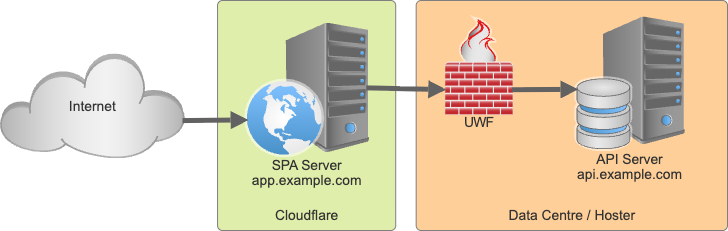
Your application is ready, you want to prepare for the incoming storm of users, so you separate your SPI server from your UI. To host the UI Cloudflare is chosen, while the API server sits in its data centre. There are a few steps to be had, which are simple, just the AI was acting cute, so I write it down.
Workers & Pages
We shall update our single page application whenever new contenet gets merged into main. All calls to /api/* need to get routed to the API server. These are the steps that wrok. Nota bene: if you want to push from your local machine, the steps are differen and a story for another time.
- In Cloudflare head to `Build, Compute & AI, Workers & Pages
- Don't get distracted by the blue "Create application" button, you want to click above it and select
+ Addand then Pages (don't select "Worker") - Select "Import an existing Git repository" and select your repo (You need the GitHub integration for that).
- configure your build settings, for a viteJS applicationa, the build command is
npm run buildand the output directory isdist. Save it and you are good to go.
Next step is to configure "Custom domains", so app.example.com points to your page. Follow the UI, it is almost automagic when Cloudflare is your DNS provider
Redirecting /api
We want loudflare to proxy it, not to 30x redirect. This will allow to harden the API (e.g. drop all request not coming from Cloudflare) later on. Search, with and without AI, suggested solutions revolving around files: _routes.json or _worker.js or elaborate wrangler setups. They all have in common: they didn't work.
What worked: create a folder functions at the root of your repository. Inside add a file [[path]].js - yes, that's two pairs of square brackets and th letters p a t h. It's the catch all for functions. Inside you add:
export async function onRequest(context) {
  const { request } = context;
  const url = new URL(request.url);

  // Test endpoint
  if (url.pathname === '/helloworld') {
    return new Response('Workers of the world unite!', {
      headers: { 'Content-Type': 'text/plain' }
    });
  }

  // Proxy API requests
  if (url.pathname.startsWith('/api/')) {
    url.hostname = 'api.example.com';
    url.port = '4443';
    url.protocol = 'https:';

    return fetch(url, request);
  }

  return context.next();
Hardening the setup is a story for another time.
As usual YMMV
Posted by Stephan H Wissel on 20 January 2026 | Comments (0) | categories: Cloudflare WebDevelopment